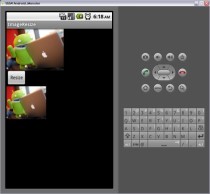
ImageView에 있는 그림을 변경해 보도록 하자.
mail.xml
|
<?xml version="1.0" encoding="utf-8"?>
<LinearLayout xmlns:android="http://schemas.android.com/apk/res/android" android:orientation="vertical" android:layout_width="fill_parent" android:layout_height="fill_parent" > <ImageView 기존 원본 이미지 android:id="@+id/ImageView01" android:layout_width="wrap_content" android:layout_height="wrap_content" /> <Button 변경 버튼 android:text="Resize" android:id="@+id/Button01" android:layout_width="wrap_content" android:layout_height="wrap_content" /> <ImageView 변경된 이미지가 보여질 부분 android:id="@+id/ImageView02" android:layout_width="wrap_content" android:layout_height="wrap_content" /> </LinearLayout> |
ImageResize.java
|
package com.androidstudy.ImageResize;
import android.app.Activity; import android.graphics.Bitmap; import android.graphics.Matrix; import android.graphics.drawable.BitmapDrawable; import android.os.Bundle; import android.util.Log; import android.view.View; import android.widget.Button; import android.widget.ImageView; import android.widget.ImageView.ScaleType; public class ImageResize extends Activity { private ImageView ImgvResize = null; private ImageView ImgvSource = null; /** Called when the activity is first created. */ @Override public void onCreate(Bundle savedInstanceState) { super.onCreate(savedInstanceState); setContentView(R.layout.main); ImgvSource = (ImageView)findViewById(R.id.ImageView01); ImgvSource.setImageResource(R.drawable.android_productivity); ImgvResize = (ImageView)findViewById(R.id.ImageView02); ImgvResize.setScaleType(ScaleType.CENTER); Button btn =(Button)findViewById(R.id.Button01); btn.setOnClickListener( new View.OnClickListener() { @Override public void onClick(View v) { ImageResizeClickEvent( v ); } }); } /* * Bitmap 이미지 리사이즈 * Src : 원본 Bitmap * newHeight : 새로운 높이 * newWidth : 새로운 넓이 * 참고 소스 : http://skyswim42.egloos.com/3477279 ( webview 에서 capture 화면 resizing 하는 source 도 있음 ) */ private BitmapDrawable BitmapResizePrc( Bitmap Src, int newHeight, int newWidth) { BitmapDrawable Result = null; int width = Src.getWidth(); int height = Src.getHeight(); // calculate the scale - in this case = 0.4f float scaleWidth = ((float) newWidth) / width; float scaleHeight = ((float) newHeight) / height; // createa matrix for the manipulation Matrix matrix = new Matrix(); // resize the bit map matrix.postScale(scaleWidth, scaleHeight); // rotate the Bitmap 회전 시키려면 주석 해제! //matrix.postRotate(45); // recreate the new Bitmap Bitmap resizedBitmap = Bitmap.createBitmap(Src, 0, 0, width, height, matrix, true); // check width = resizedBitmap.getWidth(); height = resizedBitmap.getHeight(); Log.i("ImageResize", "Image Resize Result : " + Boolean.toString((newHeight==height)&&(newWidth==width)) ); // make a Drawable from Bitmap to allow to set the BitMap // to the ImageView, ImageButton or what ever Result = new BitmapDrawable(resizedBitmap); return Result; } private void ImageResizeClickEvent( View v ) { ImgvSource.buildDrawingCache(); Bitmap bitmapOrg = ImgvSource.getDrawingCache(); BitmapDrawable bmpResize = this.BitmapResizePrc(bitmapOrg, 100, 120); // set the Drawable on the ImageView ImgvResize.setImageDrawable(bmpResize); } } |
결과