
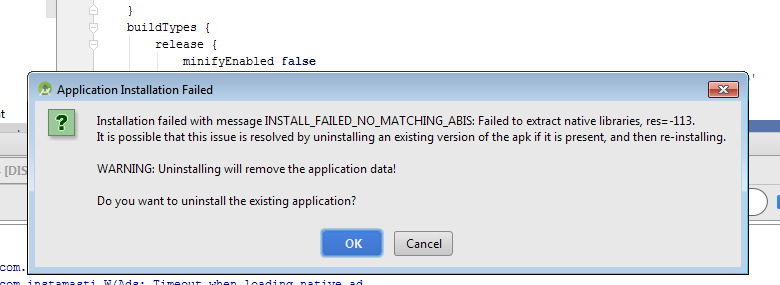
Sometime when we install apk in Genymotion or Android Emulator this error comes and apk fail to install in vertual device. Also we get following error in trace
$ adb shell pm install -r "/data/local/tmp/com.instamasti"
Failure [INSTALL_FAILED_NO_MATCHING_ABIS: Failed to extract native libraries, res=-113]
$ adb shell pm uninstall com.instamasti
DELETE_FAILED_INTERNAL_ERROR
Error while Installing APK
|
| Error Dialog |
Cause of this issue
This problem also come with when working with unity also. The problem is your app uses ARM architecture and the device or emulator that you are trying to install the app support otherwise such as x86. Try installing it on ARM emulator. Hope that solves the problem.
Solution For this issue
There could be 2 solutionn for this problem.
Technorati Tags: Apk Installation issue in Android Emulator,Android Development issues,Android Lad,Android for beginner
Solution 1:
If you are working on NDK and you creating binary file then
In your application.mk, try to add x86 at
APP_ABI := armeabi-v7a
and it should be look like this
APP_ABI := armeabi-v7a x86
Solution 2:
When you are using third party library or you have binary file then you need to add extra line in you build.gradle
I was able to use the x86 Accelerated (HAXM) emulator by simply adding this to my Module's build.gradle script Insideandroid{} block:
 android {
    compileSdkVersion 23
    buildToolsVersion "23.0.2"

    defaultConfig {
        applicationId "com.appname"
        minSdkVersion 16
        targetSdkVersion 23
        versionCode 1
        versionName "1.0"
    }
    buildTypes {
        release {
            minifyEnabled false
            proguardFiles getDefaultProguardFile('proguard-android.txt'), 'proguard-rules.pro'
        }
    }
    splits {
        abi {
            enable true
            reset()
            include 'x86', 'armeabi-v7a'
            universalApk true
        }
    }
Please comment below for any query and also please appreciate if you feel helpful.
