샘플소스파일 -> main.zip
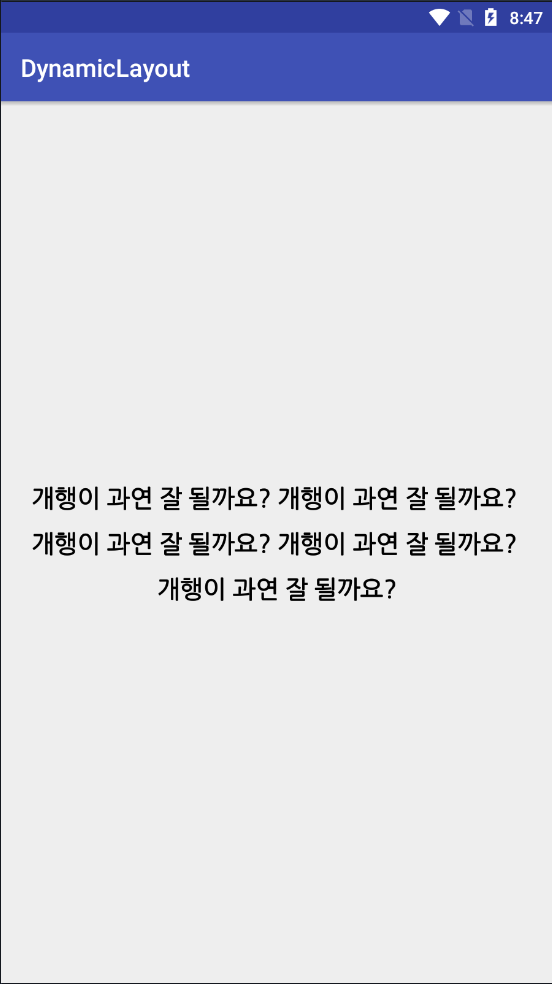
Linear Layout 밖에 없는 XML에 동적으로 TextView와 LinearLayout을 생성하여 자동 개행하는 기능을 구현해보겠습니다.
구현하고자 하는 기능
1. 문자열을 공백을 기준으로 String 배열에 저장합니다.
2. 저장된 String 배열의 요소를 각각 TextView에 넣습니다.
3. TextView는 다시 동적으로 생성한 Linear Layout에 추가합니다.
4. TextView 길이의 합이 부모뷰의 가로길이보다 클 경우 다음 LinearLayout에 추가합니다.
5. 생성된 LinearLayout을 뷰에 추가해줍니다.
<!--activity_main.xml-->
<?xml version="1.0" encoding="utf-8"?>
<LinearLayout xmlns:android="http://schemas.android.com/apk/res/android"
xmlns:app="http://schemas.android.com/apk/res-auto"
xmlns:tools="http://schemas.android.com/tools"
android:id="@+id/contents"
android:layout_width="match_parent"
android:layout_height="match_parent"
android:orientation="vertical"
android:gravity="center"
tools:context="com.study.dynamiclayout.MainActivity">
</LinearLayout>
package com.study.dynamiclayout;
import android.content.Context;
import android.graphics.Color;
import android.graphics.Typeface;
import android.support.v4.widget.TextViewCompat;
import android.util.Log;
import android.view.View;
import android.view.ViewGroup;
import android.widget.LinearLayout;
import android.widget.TextView;
/**
* Created by mapl0 on 2018-03-20.
*/
public class DynamicNewLine {
public DynamicNewLine() {}
public void getNewLineLayout(final String str, final int fontSize, final Context context, final ViewGroup parent) {
//부모뷰가 초기화가 된 다음 메소드를 실행해주지 않으면 contents의 getWidth 값은 0을 반환한다.
parent.post(new Runnable() {
@Override
public void run() {
String[] strArr = str.split(" ");
int space = fontSize / 2; // 폰트크기의 절반만큼을 공백으로 사용함.
int textViewTotalWidth = 0; //TextView의 길이 합을 알기 위해 사용합니다.
int linearCount = 0;
//분할된 문자열을 저장한 TextView 동적 생성
TextView[] textViewArr = new TextView[strArr.length];
//TextView 초기화
for (int i = 0; i < textViewArr.length; i++) {
//동적 레이아웃 생성
textViewArr[i] = new TextView(context);
textViewArr[i].setText(strArr[i]);
textViewArr[i].setTextSize(fontSize);
LinearLayout.LayoutParams params = new LinearLayout.LayoutParams(
ViewGroup.LayoutParams.WRAP_CONTENT,
ViewGroup.LayoutParams.WRAP_CONTENT);
textViewArr[i].setLayoutParams(params);
textViewArr[i].setTextColor(Color.BLACK);
textViewArr[i].setTypeface(Typeface.DEFAULT_BOLD);
textViewArr[i].setSingleLine();
//부모 뷰에서 onDraw 하기 전에 부모뷰에 크기를 위임하여 길이를 알아오기 위함
textViewArr[i].measure(View.MeasureSpec.UNSPECIFIED, View.MeasureSpec.UNSPECIFIED);
textViewTotalWidth += textViewArr[i].getMeasuredWidth();
//마지막 TextView가 아닐 경우 공백 추가
if(i != textViewArr.length-1) {
params.setMargins(0, 0, space, 0);
textViewTotalWidth += space;
}
}
//TextViewTotalWidth를 이용하여 동적 생성할 Linear Layout의 개수를 알 수 있다.
//텍스트뷰 길이의 합을 부모뷰의 가로길이로 나눈다.
LinearLayout[] linearBox;
if(parent.getWidth() != 0) {
//LinearLayout 초기화
linearBox = new LinearLayout[textViewTotalWidth / parent.getWidth() + 1];
for (int i = 0; i < linearBox.length; i++) {
linearBox[i] = new LinearLayout(context);
LinearLayout.LayoutParams params = new LinearLayout.LayoutParams(ViewGroup.LayoutParams.WRAP_CONTENT, ViewGroup.LayoutParams.WRAP_CONTENT);
params.setMargins(0, space, 0, space);
linearBox[i].setLayoutParams(params);
linearBox[i].setOrientation(LinearLayout.HORIZONTAL);
}
textViewTotalWidth = 0;
for(int i=0; i<textViewArr.length; i++) {
textViewArr[i].measure(View.MeasureSpec.UNSPECIFIED, View.MeasureSpec.UNSPECIFIED);
textViewTotalWidth += textViewArr[i].getMeasuredWidth();
//마지막 TextView가 아닐 경우 공백 추가
if(i != textViewArr.length-1) {
textViewTotalWidth += space;
}
//만약 가로뷰보다 추가될 텍스트뷰 가로합이 더 작다면 레이아웃에 추가해줌.
if(linearCount < linearBox.length && textViewTotalWidth < parent.getWidth()) {
linearBox[linearCount].addView(textViewArr[i]);
} else {
//그렇지 않으면 다음 레이아웃으로 넘거가고 같은 작업을 다시 실시
textViewTotalWidth = 0;
linearCount++;
i--; // 같은 작업을 한번 더 실시하게 함.
}
}
//마지막으로 부모뷰에 레이아웃을 추가해준다.
for(int i=0; i<linearBox.length; i++) {
parent.addView(linearBox[i]);
}
}
else Log.d("Error", "부모뷰의 getWidth를 구할 수 없습니다.");
}
});
}
}
package com.study.dynamiclayout;
import android.content.Context;
import android.os.Bundle;
import android.support.v7.app.AppCompatActivity;
import android.widget.LinearLayout;
public class MainActivity extends AppCompatActivity {
private android.widget.LinearLayout contents;
private Context context;
@Override
protected void onCreate(Bundle savedInstanceState) {
super.onCreate(savedInstanceState);
setContentView(R.layout.activity_main);
this.contents = (LinearLayout) findViewById(R.id.contents);
context = this;
DynamicNewLine dynamic = new DynamicNewLine();
dynamic.getNewLineLayout("개행이 과연 잘 될까요? 개행이 과연 잘 될까요? 개행이 과연 잘 될까요? 개행이 과연 잘 될까요? 개행이 과연 잘 될까요?", 20, context, contents);
}
}
결과화면