
Android Animation is used to give the UI a rich look and feel. Animations in android apps can be performed through XML or android code. In this android animation tutorial we’ll go with XML codes for adding animations into our application.
Table of Contents [hide]
- 1 Android Animation
- 1.1 Android Animation Example XML
- 1.2 Loading Animation when UI widget is clicked
- 1.3 Setting the Animation Listeners
- 1.4 Android Animation Project Structure
- 1.5 Android Animation Examples XML Code
- 1.6 Fade In Animation
- 1.7 Fade Out Animation
- 1.8 Cross Fading Animation
- 1.9 Blink Animation
- 1.10 Zoom In Animation
- 1.11 Zoom Out Animation
- 1.12 Rotate Animation
- 1.13 Move Animation
- 1.14 Slide Up Animation
- 1.15 Slide Down Animation
- 1.16 Bounce Animation
- 1.17 Sequential Animation
- 1.18 Together Animation
- 1.19 Code
Android Animation
Animation in android apps is the process of creating motion and shape change. The basic ways of animation that we’ll look upon in this tutorial are:
- Fade In Animation
- Fade Out Animation
- Cross Fading Animation
- Blink Animation
- Zoom In Animation
- Zoom Out Animation
- Rotate Animation
- Move Animation
- Slide Up Animation
- Slide Down Animation
- Bounce Animation
- Sequential Animation
- Together Animation
Android Animation Example XML
We create a resource directory under the res folder names anim to keep all the xml files containing the animation logic. Following is a sample xml file showing an android animation code logic.
sample_animation.xml
<?xml version="1.0" encoding="utf-8"?>
<scale xmlns:android="http://schemas.android.com/apk/res/android"
  android:interpolator="@android:anim/accelerate_decelerate_interpolator"
  android:duration="300"
  android:fillAfter="true"
  android:fromXScale="0.0"
  android:fromYScale="0.0"
  android:toXScale="1.0"
  android:toYScale="1.0" />
- android:interpolator : It is the rate of change in animation. We can define our own interpolators using the time as the constraint. In the above xml code an inbuilt interpolator is assigned
- android:duration : Duration of the animation in which the animation should complete. It is 300ms here. This is generally the ideal duration to show the transition on the screen.
The start and end of the animation are set using:
android:fromTRANSFORMATION
android:toTRANSFORMATION
- TRANSFORMATION : is the transformation that we want to specify. In our case we start with an x and y scale of 0 and end with an x and y scale of 1
- android:fillAfter : property specifies whether the view should be visible or hidden at the end of the animation. We’ve set it visible in the above code. If it sets to false, the element changes to its previous state after the animation
- android:startOffset : It is the waiting time before an animation starts. This property is mainly used to perform multiple animations in a sequential manner
- android:repeatMode : This is useful when you want the animation to be repeat
- android:repeatCount : This defines number of repetitions on animation. If we set this value to infinite then animation will repeat infinite times
Loading Animation when UI widget is clicked
Our aim is to show an animation when any widget(lets say TextView) is clicked. For that we need to use the Animation Class. The xml file that contains the animation logic is loaded using AnimationUtils class by calling the loadAnimation() function. The below snippet shows this implementation.
Animation animation;
animation = AnimationUtils.loadAnimation(getApplicationContext(),
                R.anim.sample_animation);
To start the animation we need to call the startAnimation() function on the UI element as shown in the snippet below:
sampleTextView.startAnimation(animation);
Here we perform the animation on a textview component by passing the type of Animation as the parameter.
Setting the Animation Listeners
This is only needed if we wish to listen to events like start, end or repeat. For this the activity must implement AnimationListener and the following methods need to overridden.
- onAnimationStart : This will be triggered once the animation started
- onAnimationEnd : This will be triggered once the animation is over
- onAnimationRepeat : This will be triggered if the animation repeats
Android Animation Project Structure
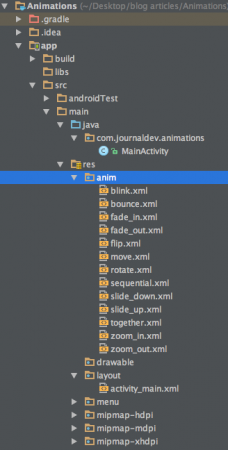
As you can see, we’ve included the xml of all the major types of animations covered above.
Android Animation Examples XML Code
Here I am providing sample code for most of the common android animations.
Fade In Animation
fade_in.xml
<set xmlns:android="http://schemas.android.com/apk/res/android"
    android:fillAfter="true" >

    <alpha
        android:duration="1000"
        android:fromAlpha="0.0"
        android:interpolator="@android:anim/accelerate_interpolator"
        android:toAlpha="1.0" />

</set>
Here alpha references the opacity of an object. An object with lower alpha values is more transparent, while an object with higher alpha values is less transparent, more opaque. Fade in animation is nothing but increasing alpha value from 0 to 1.
Fade Out Animation
fade_out.xml
<set xmlns:android="http://schemas.android.com/apk/res/android"
    android:fillAfter="true" >

    <alpha
        android:duration="1000"
        android:fromAlpha="1.0"
        android:interpolator="@android:anim/accelerate_interpolator"
        android:toAlpha="0.0" />

</set>
Fade out android animation is exactly opposite to fade in, where we need to decrease the alpha value from 1 to 0.
Cross Fading Animation
Cross fading is performing fade in animation on one TextView while other TextView is fading out. This can be done by using fade_in.xml and fade_out.xml on the two TextViews. The code will be discussed in the MainActivity.java
Blink Animation
blink.xml
<set xmlns:android="http://schemas.android.com/apk/res/android">
    <alpha android:fromAlpha="0.0"
        android:toAlpha="1.0"
        android:interpolator="@android:anim/accelerate_interpolator"
        android:duration="600"
        android:repeatMode="reverse"
        android:repeatCount="infinite"/>
</set>
Here fade in and fade out are performed infinitely in reverse mode each time.
Zoom In Animation
zoom_in.xml
<set xmlns:android="http://schemas.android.com/apk/res/android"
    android:fillAfter="true" >

    <scale
        xmlns:android="http://schemas.android.com/apk/res/android"
        android:duration="1000"
        android:fromXScale="1"
        android:fromYScale="1"
        android:pivotX="50%"
        android:pivotY="50%"
        android:toXScale="3"
        android:toYScale="3" >
    </scale>

</set>
We use pivotX="50%" and pivotY="50%" to perform zoom from the center of the element.
Zoom Out Animation
zoom_out.xml
<set xmlns:android="http://schemas.android.com/apk/res/android"
    android:fillAfter="true" >

    <scale
        xmlns:android="http://schemas.android.com/apk/res/android"
        android:duration="1000"
        android:fromXScale="1.0"
        android:fromYScale="1.0"
        android:pivotX="50%"
        android:pivotY="50%"
        android:toXScale="0.5"
        android:toYScale="0.5" >
    </scale>

</set>
Notice that android:from and android:to are opposite in zoom_in.xml and zoom_out.xml.
Rotate Animation
rotate.xml
<set xmlns:android="http://schemas.android.com/apk/res/android">
    <rotate android:fromDegrees="0"
        android:toDegrees="360"
        android:pivotX="50%"
        android:pivotY="50%"
        android:duration="600"
        android:repeatMode="restart"
        android:repeatCount="infinite"
        android:interpolator="@android:anim/cycle_interpolator"/>

</set>
A from/toDegrees tag is used here to specify the degrees and a cyclic interpolator is used.
Move Animation
move.xml
<set
    xmlns:android="http://schemas.android.com/apk/res/android"
    android:interpolator="@android:anim/linear_interpolator"
    android:fillAfter="true">

   <translate
        android:fromXDelta="0%p"
        android:toXDelta="75%p"
        android:duration="800" />
</set>
Slide Up Animation
slide_up.xml
<set xmlns:android="http://schemas.android.com/apk/res/android"
    android:fillAfter="true" >

    <scale
        android:duration="500"
        android:fromXScale="1.0"
        android:fromYScale="1.0"
        android:interpolator="@android:anim/linear_interpolator"
        android:toXScale="1.0"
        android:toYScale="0.0" />

</set>
It’s achieved by setting android:fromYScale=”1.0″ and android:toYScale=”0.0″ inside the scale tag.
Slide Down Animation
slide_down.xml
<set xmlns:android="http://schemas.android.com/apk/res/android"
    android:fillAfter="true">

    <scale
        android:duration="500"
        android:fromXScale="1.0"
        android:fromYScale="0.0"
        android:toXScale="1.0"
        android:toYScale="1.0" />

</set>
This is just the opposite of slide_up.xml.
Bounce Animation
bounce.xml
<set xmlns:android="http://schemas.android.com/apk/res/android"
    android:fillAfter="true"
    android:interpolator="@android:anim/bounce_interpolator">

    <scale
        android:duration="500"
        android:fromXScale="1.0"
        android:fromYScale="0.0"
        android:toXScale="1.0"
        android:toYScale="1.0" />

</set>
Here bounce interpolator is used to complete the animation in bouncing fashion.
Sequential Animation
sequential.xml
<set xmlns:android="http://schemas.android.com/apk/res/android"
    android:fillAfter="true"
    android:interpolator="@android:anim/linear_interpolator" >


    <!-- Move -->
    <translate
        android:duration="800"
        android:fillAfter="true"
        android:fromXDelta="0%p"
        android:startOffset="300"
        android:toXDelta="75%p" />
    <translate
        android:duration="800"
        android:fillAfter="true"
        android:fromYDelta="0%p"
        android:startOffset="1100"
        android:toYDelta="70%p" />
    <translate
        android:duration="800"
        android:fillAfter="true"
        android:fromXDelta="0%p"
        android:startOffset="1900"
        android:toXDelta="-75%p" />
    <translate
        android:duration="800"
        android:fillAfter="true"
        android:fromYDelta="0%p"
        android:startOffset="2700"
        android:toYDelta="-70%p" />

    <!-- Rotate 360 degrees -->
    <rotate
        android:duration="1000"
        android:fromDegrees="0"
        android:interpolator="@android:anim/cycle_interpolator"
        android:pivotX="50%"
        android:pivotY="50%"
        android:startOffset="3800"
        android:repeatCount="infinite"
        android:repeatMode="restart"
        android:toDegrees="360" />

</set>
Here a different android:startOffset is used from the transitions to keep them sequential.
Together Animation
together.xml
<set xmlns:android="http://schemas.android.com/apk/res/android"
    android:fillAfter="true"
    android:interpolator="@android:anim/linear_interpolator" >


    <!-- Move -->
    <scale
        xmlns:android="http://schemas.android.com/apk/res/android"
        android:duration="4000"
        android:fromXScale="1"
        android:fromYScale="1"
        android:pivotX="50%"
        android:pivotY="50%"
        android:toXScale="4"
        android:toYScale="4" >
    </scale>

    <!-- Rotate 180 degrees -->
    <rotate
        android:duration="500"
        android:fromDegrees="0"
        android:pivotX="50%"
        android:pivotY="50%"
        android:repeatCount="infinite"
        android:repeatMode="restart"
        android:toDegrees="360" />

</set>
Here android:startOffset is removed to let them happen simultaneously.
Code
The activity_main.xml layout consists of a ScrollView and RelativeLayout (we’ll discuss this in a later tutorial) in which every animation type is invoked on the text using their respective buttons. The xml file is shown below :
activity_main.xml
<ScrollView xmlns:android="http://schemas.android.com/apk/res/android"
    android:layout_width="fill_parent"
    android:layout_height="fill_parent" >

    <RelativeLayout
        android:layout_width="match_parent"
        android:layout_height="match_parent">

        <Button
                android:id="@+id/btnFadeIn"
                android:layout_width="wrap_content"
                android:layout_height="wrap_content"
                android:layout_margin="5dp"
                android:text="Fade In" />

        <TextView
                android:layout_width="wrap_content"
                android:layout_height="wrap_content"
                android:textAppearance="?android:attr/textAppearanceMedium"
                android:text="Fade In"
                android:id="@+id/txt_fade_in"
            android:layout_alignBottom="@+id/btnFadeIn"
            android:layout_alignLeft="@+id/txt_fade_out"
            android:layout_alignStart="@+id/txt_fade_out" />


        <Button
                android:id="@+id/btnFadeOut"
                android:layout_width="wrap_content"
                android:layout_height="wrap_content"
                android:layout_margin="5dp"
                android:layout_below="@id/btnFadeIn"
                android:text="Fade Out" />


        <Button
                android:id="@+id/btnCrossFade"
                android:layout_width="wrap_content"
                android:layout_height="wrap_content"
                android:layout_margin="5dp"
                android:layout_below="@id/btnFadeOut"
                android:text="Cross Fade" />

        <TextView
                android:layout_width="wrap_content"
                android:layout_height="wrap_content"
                android:textAppearance="?android:attr/textAppearanceMedium"
                android:text="Cross Fade In"
                android:id="@+id/txt_out"
                android:visibility="gone"
                android:layout_gravity="center_horizontal"
                android:layout_alignTop="@+id/txt_in"
                android:layout_alignLeft="@+id/txt_in"
                android:layout_alignStart="@+id/txt_in" />

        <Button
                android:id="@+id/btnBlink"
                android:layout_width="wrap_content"
                android:layout_height="wrap_content"
                android:layout_margin="5dp"
                android:layout_below="@id/btnCrossFade"
                android:text="Blink" />

        <Button
                android:id="@+id/btnZoomIn"
                android:layout_width="wrap_content"
                android:layout_height="wrap_content"
                android:layout_margin="5dp"
                android:layout_below="@id/btnBlink"
                android:text="Zoom In" />

        <TextView
                android:layout_width="wrap_content"
                android:layout_height="wrap_content"
                android:textAppearance="?android:attr/textAppearanceMedium"
                android:text="Blink"
                android:id="@+id/txt_blink"
                android:layout_gravity="center_horizontal"
            android:layout_alignBottom="@+id/btnBlink"
            android:layout_alignLeft="@+id/txt_zoom_in"
            android:layout_alignStart="@+id/txt_zoom_in" />

        <Button
                android:id="@+id/btnZoomOut"
                android:layout_width="wrap_content"
                android:layout_height="wrap_content"
                android:layout_margin="5dp"
                android:layout_below="@id/btnZoomIn"
                android:text="Zoom Out" />

        <Button
                android:id="@+id/btnRotate"
                android:layout_width="wrap_content"
                android:layout_height="wrap_content"
                android:layout_margin="5dp"
                android:layout_below="@id/btnZoomOut"
                android:text="Rotate" />

        <Button
                android:id="@+id/btnMove"
                android:layout_width="wrap_content"
                android:layout_height="wrap_content"
                android:layout_margin="5dp"
                android:layout_below="@id/btnRotate"
                android:text="Move" />

        <Button
                android:id="@+id/btnSlideUp"
                android:layout_width="wrap_content"
                android:layout_height="wrap_content"
                android:layout_margin="5dp"
                android:layout_below="@id/btnMove"
                android:text="Slide Up" />

        <TextView
                android:layout_width="wrap_content"
                android:layout_height="wrap_content"
                android:textAppearance="?android:attr/textAppearanceMedium"
                android:text="Fade Out"
                android:id="@+id/txt_fade_out"
                android:layout_gravity="center_horizontal"
            android:layout_alignBottom="@+id/btnFadeOut"
            android:layout_alignLeft="@+id/txt_in"
            android:layout_alignStart="@+id/txt_in" />

        <Button
                android:id="@+id/btnSlideDown"
                android:layout_width="wrap_content"
                android:layout_height="wrap_content"
                android:layout_margin="5dp"
                android:layout_below="@id/btnSlideUp"
                android:text="Slide Down" />

        <Button
                android:id="@+id/btnBounce"
                android:layout_width="wrap_content"
                android:layout_height="wrap_content"
                android:layout_margin="5dp"
                android:layout_below="@id/btnSlideDown"
                android:text="Bounce" />

        <Button
                android:id="@+id/btnSequential"
                android:layout_width="wrap_content"
                android:layout_height="wrap_content"
                android:layout_margin="5dp"
                android:layout_below="@id/btnBounce"
                android:text="Sequential Animation" />

        <Button
                android:id="@+id/btnTogether"
                android:layout_width="wrap_content"
                android:layout_height="wrap_content"
                android:layout_below="@id/btnSequential"
                android:layout_margin="5dp"
                android:text="Together Animation" />

        <TextView
                android:layout_width="wrap_content"
                android:layout_height="wrap_content"
                android:textAppearance="?android:attr/textAppearanceMedium"
                android:text="Cross Fade Out"
                android:id="@+id/txt_in"
                android:layout_gravity="center_horizontal"
            android:layout_alignBottom="@+id/btnCrossFade"
            android:layout_alignLeft="@+id/txt_blink"
            android:layout_alignStart="@+id/txt_blink" />

        <TextView
            android:layout_width="wrap_content"
            android:layout_height="wrap_content"
            android:textAppearance="?android:attr/textAppearanceMedium"
            android:text="Zoom In"
            android:id="@+id/txt_zoom_in"
            android:layout_alignBottom="@+id/btnZoomIn"
            android:layout_alignLeft="@+id/txt_zoom_out"
            android:layout_alignStart="@+id/txt_zoom_out" />

        <TextView
            android:layout_width="wrap_content"
            android:layout_height="wrap_content"
            android:textAppearance="?android:attr/textAppearanceMedium"
            android:text="Zoom Out"
            android:id="@+id/txt_zoom_out"
            android:layout_alignBottom="@+id/btnZoomOut"
            android:layout_toRightOf="@+id/btnSequential"
            android:layout_toEndOf="@+id/btnSequential" />

        <TextView
            android:layout_width="wrap_content"
            android:layout_height="wrap_content"
            android:textAppearance="?android:attr/textAppearanceMedium"
            android:text="Rotate"
            android:id="@+id/txt_rotate"
            android:layout_above="@+id/btnMove"
            android:layout_toRightOf="@+id/btnSequential"
            android:layout_toEndOf="@+id/btnSequential" />

        <TextView
            android:layout_width="wrap_content"
            android:layout_height="wrap_content"
            android:textAppearance="?android:attr/textAppearanceMedium"
            android:text="Move"
            android:id="@+id/txt_move"
            android:layout_alignBottom="@+id/btnMove"
            android:layout_alignLeft="@+id/txt_slide_up"
            android:layout_alignStart="@+id/txt_slide_up" />

        <TextView
            android:layout_width="wrap_content"
            android:layout_height="wrap_content"
            android:textAppearance="?android:attr/textAppearanceMedium"
            android:text="Slide Up"
            android:id="@+id/txt_slide_up"
            android:layout_alignBottom="@+id/btnSlideUp"
            android:layout_toRightOf="@+id/btnSequential"
            android:layout_toEndOf="@+id/btnSequential" />

        <TextView
            android:layout_width="wrap_content"
            android:layout_height="wrap_content"
            android:textAppearance="?android:attr/textAppearanceMedium"
            android:text="Slide Down"
            android:id="@+id/txt_slide_down"
            android:layout_alignBottom="@+id/btnSlideDown"
            android:layout_alignLeft="@+id/txt_slide_up"
            android:layout_alignStart="@+id/txt_slide_up" />

        <TextView
            android:layout_width="wrap_content"
            android:layout_height="wrap_content"
            android:textAppearance="?android:attr/textAppearanceMedium"
            android:text="Bounce"
            android:id="@+id/txt_bounce"
            android:layout_alignBottom="@+id/btnBounce"
            android:layout_alignLeft="@+id/txt_slide_down"
            android:layout_alignStart="@+id/txt_slide_down" />

        <TextView
            android:layout_width="wrap_content"
            android:layout_height="wrap_content"
            android:textAppearance="?android:attr/textAppearanceMedium"
            android:text="Sequential"
            android:id="@+id/txt_seq"
            android:layout_alignBottom="@+id/btnSequential"
            android:layout_alignLeft="@+id/txt_bounce"
            android:layout_alignStart="@+id/txt_bounce" />

        <TextView
            android:layout_width="wrap_content"
            android:layout_height="wrap_content"
            android:textAppearance="?android:attr/textAppearanceMedium"
            android:text="Together"
            android:id="@+id/txt_tog"
            android:layout_alignBottom="@+id/btnTogether"
            android:layout_toRightOf="@+id/btnSequential"
            android:layout_toEndOf="@+id/btnSequential" />

    </RelativeLayout>

</ScrollView>
To sum up, a RelativeLayout, as the name suggests the arrangement of UI Components is relative to each other.
The MainActivity.java file contains the onClick Listeners for every button related to its animation type. It’s source code is given below.
package com.journaldev.animations;

import android.app.Activity;
import android.content.Intent;
import android.os.Bundle;
import android.view.View;
import android.view.animation.Animation;
import android.view.animation.AnimationUtils;
import android.widget.Button;
import android.widget.TextView;

public class MainActivity extends Activity {

    Button btnFadeIn, btnFadeOut, btnCrossFade, btnBlink, btnZoomIn,
            btnZoomOut, btnRotate, btnMove, btnSlideUp, btnSlideDown,
            btnBounce, btnSequential, btnTogether;
    Animation animFadeIn,animFadeOut,animBlink,animZoomIn,animZoomOut,animRotate
            ,animMove,animSlideUp,animSlideDown,animBounce,animSequential,animTogether,animCrossFadeIn,animCrossFadeOut;
    TextView txtFadeIn,txtFadeOut,txtBlink,txtZoomIn,txtZoomOut,txtRotate,txtMove,txtSlideUp,
                txtSlideDown,txtBounce,txtSeq,txtTog,txtIn,txtOut;

    @Override
    protected void onCreate(Bundle savedInstanceState) {
        super.onCreate(savedInstanceState);
        setContentView(R.layout.activity_main);

        btnFadeIn = (Button) findViewById(R.id.btnFadeIn);
        btnFadeOut = (Button) findViewById(R.id.btnFadeOut);
        btnCrossFade = (Button) findViewById(R.id.btnCrossFade);
        btnBlink = (Button) findViewById(R.id.btnBlink);
        btnZoomIn = (Button) findViewById(R.id.btnZoomIn);
        btnZoomOut = (Button) findViewById(R.id.btnZoomOut);
        btnRotate = (Button) findViewById(R.id.btnRotate);
        btnMove = (Button) findViewById(R.id.btnMove);
        btnSlideUp = (Button) findViewById(R.id.btnSlideUp);
        btnSlideDown = (Button) findViewById(R.id.btnSlideDown);
        btnBounce = (Button) findViewById(R.id.btnBounce);
        btnSequential = (Button) findViewById(R.id.btnSequential);
        btnTogether = (Button) findViewById(R.id.btnTogether);
        txtFadeIn=(TextView)findViewById(R.id.txt_fade_in);
        txtFadeOut=(TextView)findViewById(R.id.txt_fade_out);
        txtBlink=(TextView)findViewById(R.id.txt_blink);
        txtZoomIn=(TextView)findViewById(R.id.txt_zoom_in);
        txtZoomOut=(TextView)findViewById(R.id.txt_zoom_out);
        txtRotate=(TextView)findViewById(R.id.txt_rotate);
        txtMove=(TextView)findViewById(R.id.txt_move);
        txtSlideUp=(TextView)findViewById(R.id.txt_slide_up);
        txtSlideDown=(TextView)findViewById(R.id.txt_slide_down);
        txtBounce=(TextView)findViewById(R.id.txt_bounce);
        txtSeq=(TextView)findViewById(R.id.txt_seq);
        txtTog=(TextView)findViewById(R.id.txt_tog);
        txtIn=(TextView)findViewById(R.id.txt_in);
        txtOut=(TextView)findViewById(R.id.txt_out);
        animFadeIn = AnimationUtils.loadAnimation(getApplicationContext(),
                R.anim.fade_in);

        animFadeIn = AnimationUtils.loadAnimation(getApplicationContext(),
                R.anim.fade_in);
        // fade in
        btnFadeIn.setOnClickListener(new View.OnClickListener() {

            @Override
            public void onClick(View v) {
                txtFadeIn.setVisibility(View.VISIBLE);
                txtFadeIn.startAnimation(animFadeIn);
            }
        });

        animFadeOut = AnimationUtils.loadAnimation(getApplicationContext(),
                R.anim.fade_out);

        // fade out
        btnFadeOut.setOnClickListener(new View.OnClickListener() {
            @Override
            public void onClick(View v) {
                txtFadeOut.setVisibility(View.VISIBLE);
                txtFadeOut.startAnimation(animFadeOut);
            }
        });
        animCrossFadeIn = AnimationUtils.loadAnimation(getApplicationContext(),
                R.anim.fade_in);
        animCrossFadeOut = AnimationUtils.loadAnimation(getApplicationContext(),
                R.anim.fade_out);
        // cross fade
        btnCrossFade.setOnClickListener(new View.OnClickListener() {
            @Override
            public void onClick(View v) {
                txtOut.setVisibility(View.VISIBLE);
                // start fade in animation
                txtOut.startAnimation(animCrossFadeIn);

                // start fade out animation
                txtIn.startAnimation(animCrossFadeOut);
            }
        });
        animBlink = AnimationUtils.loadAnimation(getApplicationContext(),
                R.anim.blink);
        // blink
        btnBlink.setOnClickListener(new View.OnClickListener() {
            @Override
            public void onClick(View v) {
                txtBlink.setVisibility(View.VISIBLE);
                txtBlink.startAnimation(animBlink);
            }
        });

        animZoomIn = AnimationUtils.loadAnimation(getApplicationContext(),
                R.anim.zoom_in);
        // Zoom In
        btnZoomIn.setOnClickListener(new View.OnClickListener() {
            @Override
            public void onClick(View v) {
                txtZoomIn.setVisibility(View.VISIBLE);
                txtZoomIn.startAnimation(animZoomIn);
            }
        });
        animZoomOut = AnimationUtils.loadAnimation(getApplicationContext(),
                R.anim.zoom_out);
        // Zoom Out
        btnZoomOut.setOnClickListener(new View.OnClickListener() {
            @Override
            public void onClick(View v) {
                txtZoomOut.setVisibility(View.VISIBLE);
                txtZoomOut.startAnimation(animZoomOut);
            }
        });
        animRotate = AnimationUtils.loadAnimation(getApplicationContext(),
                R.anim.rotate);

        // Rotate
        btnRotate.setOnClickListener(new View.OnClickListener() {
            @Override
            public void onClick(View v) {
                txtRotate.startAnimation(animRotate);
            }
        });
        animMove = AnimationUtils.loadAnimation(getApplicationContext(),
                R.anim.move);
        // Move
        btnMove.setOnClickListener(new View.OnClickListener() {
            @Override
            public void onClick(View v) {
                txtMove.startAnimation(animMove);
            }
        });
        animSlideUp = AnimationUtils.loadAnimation(getApplicationContext(),
                R.anim.slide_up);
        // Slide Up
        btnSlideUp.setOnClickListener(new View.OnClickListener() {
            @Override
            public void onClick(View v) {
                txtSlideUp.startAnimation(animSlideUp);
            }
        });
        animSlideDown = AnimationUtils.loadAnimation(getApplicationContext(),
                R.anim.slide_down);
        // Slide Down
        btnSlideDown.setOnClickListener(new View.OnClickListener() {
            @Override
            public void onClick(View v) {
                txtSlideDown.startAnimation(animSlideDown);
            }
        });
        animBounce = AnimationUtils.loadAnimation(getApplicationContext(),
                R.anim.bounce);
        // Slide Down
        btnBounce.setOnClickListener(new View.OnClickListener() {
            @Override
            public void onClick(View v) {
                txtBounce.startAnimation(animBounce);
            }
        });
        animSequential = AnimationUtils.loadAnimation(getApplicationContext(),
                R.anim.sequential);
        // Sequential
        btnSequential.setOnClickListener(new View.OnClickListener() {
            @Override
            public void onClick(View v) {

                        txtSeq.startAnimation(animSequential);
            }
        });
        animTogether = AnimationUtils.loadAnimation(getApplicationContext(),
                R.anim.together);

        // Together
        btnTogether.setOnClickListener(new View.OnClickListener() {
            @Override
            public void onClick(View v) {
                txtTog.startAnimation(animTogether);
            }
        });

    }
}
As discussed before each textView animation is started by invoking the respective animation object in which the animation logic is loaded by AnimationUtils.loadAnimation() method. The crossFade animation consists of two TextViews in which one fades out and the other fades in.
Below is a short video showing all the animations in our application.
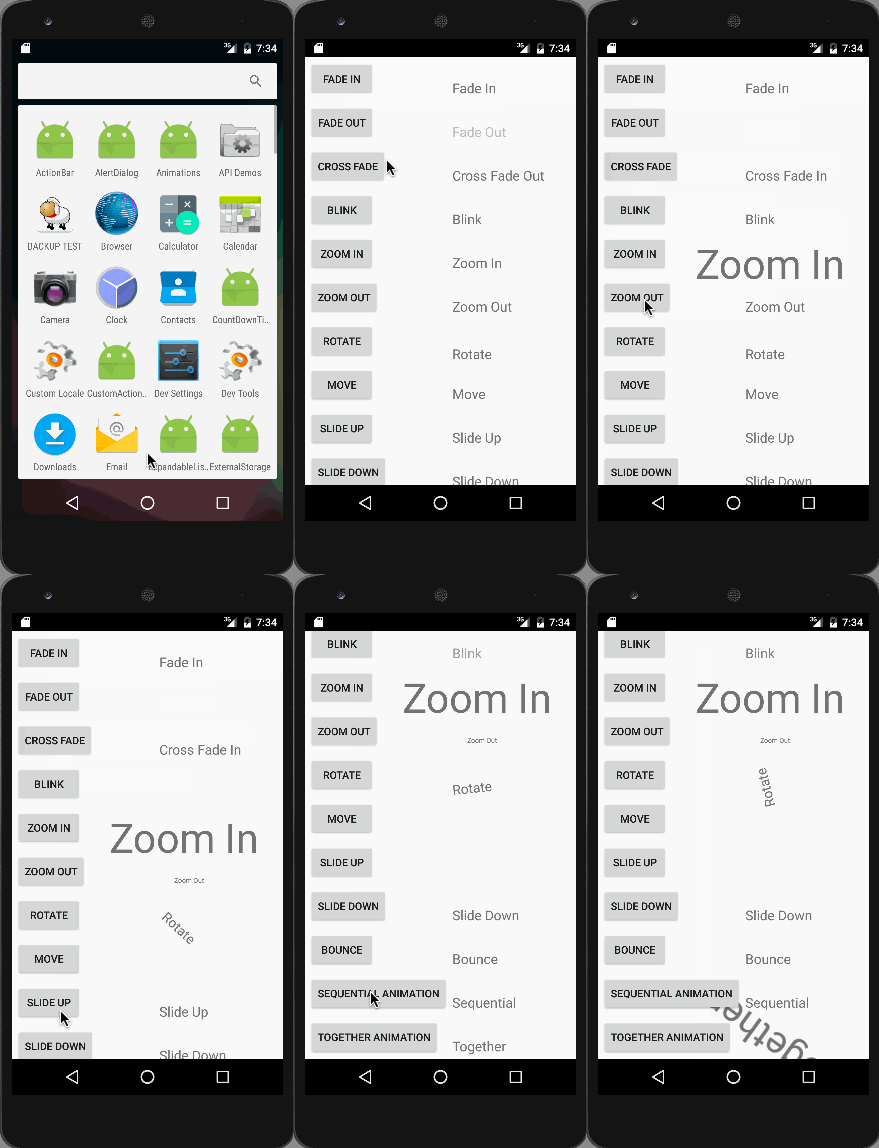
The together animation is seen in the image above. Note that these animation when run on an emulator wont be smooth, so it’s recommended to run the application on a normal device.
This brings an end to android animation example tutorial. You can download the Android Animation Example Project from the link below.
