
| sitelink1 | http://pipwerks.com/2008/11/30/iframes-a...ty-part-2/ |
|---|---|
| sitelink2 | http://pipwerks.com/2010/10/17/iframes-a...ty-part-3/ |
The problem
Recap of the issue
- I have a JavaScript-powered HTML course interface residing in our learning management system at domain A. For the purposes of this post, let’s call this domain myLMS.com.
- The course interface loads content stored on a website at domain B, which is a completely unrelated website and not a subdomain of domain A. Let’s call this site content.org.
- The interface loads the external content into an iframe; this content includes course activities that must send a completion notice to the interface.
- Since the content is from an external domain, JavaScript communication between the iframe and the parent frame is explicitly forbidden, meaning the content can never send the completion notice to the parent frame.
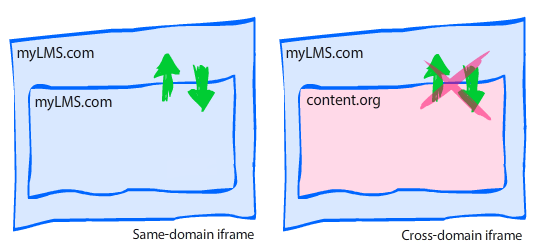
Example scenario
- The interface at myLMS.com loads a JavaScript-powered quiz question from content.org into the iframe.
- The user is not supposed to be allowed to move forward until the question is answered; this means the interface must disallow forward progress until it gets a completion notice (via JavaScript) from the quiz question.
- Since the quiz question is loaded into an iframe and is not from the same domain as the parent frame, it is not allowed to interact with the parent frame and can’t use JavaScript to communicate with the course interface. This means the completion notice can’t be sent to the course interface, and the learner can’t move forward.
The hack
What’s a boy to do? Make a hack, of course.
After searching high and low for answers, I decided to use a nested-iframe hack. From what i can tell, it’s a fairly common workaround. Here’s how it works:
- Parent frame is from domain A.
- Content in child frame (iframe) is from domain B.
- Child frame loads a hidden iframe which is served from domain A. Since this nested iframe is served from domain A, it has unrestricted access to the JavaScript in the parent frame.
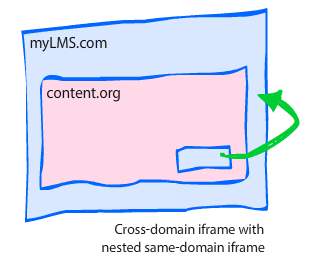
Ok, ok, it’s starting to make your head spin, right? Well, what makes it even more complicated is that the nested frame can’t communicate with the child frame, either! In fact, it all seems like a pointless exercise until you add in one crucial ingredient: a querystring in the nested iframe’s URL.
The querystring
The HTML page loaded into the nested iframe is a dedicated proxy (helper) file; it only contains JavaScript, and includes a JavaScript-based querystring parser that examines the string and executes a function based on the content of the querystring.
Here’s how the final sequence of events would look:
- myLMS.com loads quiz question from content.org into an iframe.
- When quiz question is completed, it uses JavaScript to dynamically create a nested iframe.
- Before loading the nested iframe, a querystring is added to the URL, such as
proxy.html?result=passed. - The JavaScript in the proxy HTML examines the querystring and acts accordingly. In this example, it sees that the variable “result” has a value of “passed”, so it sends a completion notice directly to the JavaScript contained in the parent frame.
The scripts
Parent frame (myLMS.com)
For this example, we’re going to assume the parent frame contains a JavaScript function named interactionCompleted.
function interactionCompleted(result){
   //Do something with result
}
Content iframe (content.org)
The content iframe, which is loaded from the external domain content.org, contains a function that creates the nested iframe element, then loads the proxy.html file with the proper querystring. You can invoke the proxy whenever you need it. In this example, it gets invoked via the setCompletion function.
function setCompletion(result){

    //The name of the frame
    var id = "proxyframe";

    //Look for existing frame with name "proxyframe"
    var proxy = frames[id];

    //Set URL and querystring
    var url = "http://myLMS.com/proxy.html?result=" +result;

    //If the proxy iframe has already been created
    if(proxy){

        //Redirect to the new URL
        proxy.location.href = url;

    } else {

        //Create the proxy iframe element.
        var iframe = document.createElement("iframe");
        iframe.id = id;
        iframe.name = id;
        iframe.src = url;
        iframe.style.display = "none";
        document.body.appendChild(iframe);

    }

}
Nested “proxy” iframe (myLMS.com)
When the content iframe creates the nested proxy frame, it appends a querystring. The proxy frame therefore needs to examine the proxy’s window.location parameter for a querystring, then act on the value of the querystring.
window.onload = function (){

    var result, pairs;
    var querystring = window.location.href.split("?")[1] || false;

    //Ensure querystring exists and has valid result identifier
    if(!querystring || querystring.indexOf("result=") === -1){ return false; }

    //Ensure all ampersands are single (not entities) so we can split using "&"
    querystring = querystring.replace(/&/g, "&");

    //Create an array of value pairs. This gives us flexibility
    //to add more items to the querystring later.
    pairs = querystring.split("&");

    //Loop through the pairs and act on each one.
    for(var i = 0; i < pairs.length; i++){

        //We're currently only looking for the 'result' value
        //We can add more if needed by adding more 'if' and 'switch' statements

        //Find 'result' variable
        if(pairs[i].indexOf("result=")){

            //Extract the value from the string by replacing the
            //identifier/assignment portion of the string with nothing ""
            result = pairs[i].replace("result=", "");

        }

    }

    //Only act on valid values.
    //DO NOT try to use eval() here.  Big no-no.
    switch(result){

        //Must specify "top." before the function invocation so that
        //the browser knows to send the JS to the topmost parent frame

        case "passed" : top.interactionCompleted("passed"); break;
        case "failed" : top.interactionCompleted("failed"); break;

    }

};
If you remove the comments and extra line breaks, this is a very short script that weighs in at 16 lines. Also, as I mentioned in the comments, please don’t try to use eval() on the querystring; it would be very unwise and would cause major security vulnerabilities, much like an SQL injection.
Thoughts and observations
Now that I’ve covered the basics, here are some general thoughts and observations on the topic.
Does this hack work in all browsers?
I can’t guarantee anything, but in my personal tests it worked in the following browsers: IE6 (XP), IE7 (Vista), Firefox 3 (XP, Vista, OS X, Ubuntu 8.10), Safari 3.1 (XP, Vista, OS X), and Opera 9.5 (XP, Vista, OS X).
Where is the proxy.html file stored?
In my example, the proxy.html file (used for the nested iframe) must be stored on the same domain as the parent file (the course interface); the key to this workaround is that the proxy.html file has unrestricted access to the topmost parent file, which it can only have when being served from the same domain.
Do the nested iframes screw up the back button?
Yes and no. I didn’t document what happens in which browser, but I know some browsers’ back buttons are unaffected by the nested iframe, while others will require one extra ‘back’ click. I don’t know about you, but I can live with one extra back button click.
What if I have some files that aren’t on a different domain?
Sometimes you’ll have some files that are on a different domain, and some that aren’t. If you have files on the same domain, you certainly wouldn’t want to use the iframe hack ? it would be completely unnecessary. In my system, I expanded on the previous example by adding a domain-matching check before invoking the proxy. It requires specifying the parent’s domain in the querystring for the content iframe. The JavaScript in the content iframe looks like this:
//Get the querystring
var querystring = window.location.href.split("?")[1] || false;

//Create boolean indicating whether domains match.
//If domains match, no need for proxy workaround.
var isSameDomain = (querystring && querystring.contains("domain=" +document.domain));

function setCompletion(result){

    if(isSameDomain && parent){
        top.interactionCompleted(result);
    } else {
        //do what's in the previous example
    }
}
document.domain can be used to find out what the current domain is for security purposes. A simple string search will tell you whether the content frame’s domain is found inside the querystring that was passed from the parent.
What if I have multiple actions I’d like to perform using the proxy?
Simple: Just add it to your querystring and build the logic into your proxy.html file’s JavaScript. You can make it as simple or complicated as you like!
Disclaimer: I have no affiliation with any real sites that may be located at mylms.com or content.org; these addresses were picked at random and only used for demonstration purposes.
